Monday, 15 October 2012

New Google Play Developer Console Available to Everyone

Posted by Eva-Lotta Lamm, Riccardo Govoni, and Ellie Powers of the Google Play team


We've been working on a new Google Play Developer Console, centered around how you make and publish apps, to create a foundation for the exciting features we have planned for the future. Earlier this year at Google I/O, we demoed the new version (video). Since then, we've been testing it out with tens of thousands of developers, reviewing their feedback and making adjustments.


Today, we’re very happy to announce that all developers can now try the new Google Play Developer Console. At its core, the Developer Console is how you put your app in front of hundreds of millions of Android users around the world, and track how your app is doing. We hope that with a streamlined publishing flow, new language options, and new user ratings statistics, you’ll have better tools for delivering great Android apps that delight users.


Sleeker, faster, easier to navigate


You spend a lot of time in the Developer Console, so we overhauled the interface for you. It's bright and appealing to look at, easy to find your way around using navigation and search, and it loads quickly even if you have a lot of apps.
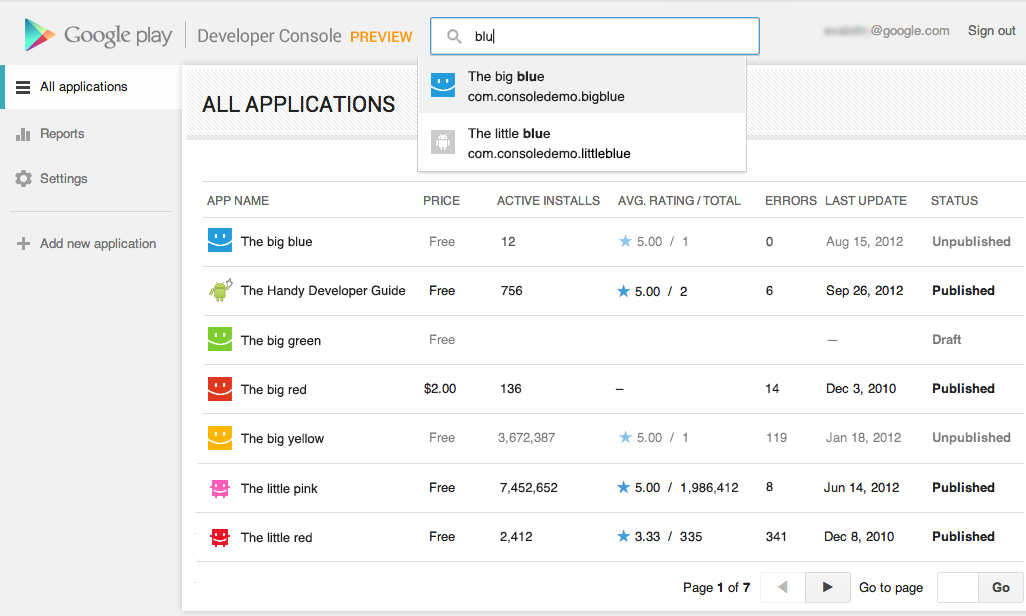


Designed for speed. Quickly locate the app data and business information you use every day. More screenshots »


Track user ratings over time, and find ways to improve


One of the most important things you'll be able to do is track the success of your app over time — it's how you continue to iterate and make beautiful, successful apps. You'll see new statistics about your user ratings: a graph showing changes over time, for both the all-time average user rating and new user ratings that come in on a certain day. As with other statistics, you'll be able to break down the data by device, country, language, carrier, Android version, and app version. For example, after optimizing your app for tablets, you could track your ratings on popular tablets.


New charts for user ratings. You can now track user ratings over time and across countries. More screenshots »


Better publishing workflow


We've completely revamped and streamlined the app publishing process to give you more time to build great apps. You can start with either an APK or an app name, and you can save before you have all of the information. You can also now see differences between the new and old versions of an app, making it easy to catch unintentional changes before you publish a new version to your users.


More languages for listings, with automated translations


You'll also enjoy a new app publishing flow and the ability to publish your app listing in 49 languages. Once you've saved any change to your application in the new Developer Console, your users will have the option of viewing an automatic translation of your listing on the web today and soon on devices — no additional action on your part is needed.


How can you try the new version?


Go to your Developer Console and click on “Try the new version” in the header or go directly to the new version. If you prefer the new version, don't forget to bookmark the new URL.


Please note that we're not quite done yet, so the following advanced features are not yet supported in the new Google Play Developer Console: multiple APK support, APK Expansion Files and announcements. To use these features, you can click “Switch back” in the header at any time to return to the old version.


Click the “Feedback” link in the header to let us know what you think, so that we can continue to improve your experience as a Google Play developer. Thank you for all of the feedback so far.



Sunday, 14 October 2012

Prince of Persia Classic APK Phones and Tablets!


You are the Prince of Persia.

You are the Prince of Persia on a daring rescue mission to save your Princess.
Fulfill your destiny, play this game, and experience the thrills and adventures of this classic tale


Features

Old tale, New skin
Replay the adventure of the original Prince of Persia in a complete new skin as you battle your way through the dungeon to rescue the Princess.

Saturday, 13 October 2012

N.O.V.A. 3 - Near Orbit Vanguard Alliance for Tablets!


The most immersive and impressive sci-fi FPS franchise on smartphones is back!

Fight for mankind's survival in the greatest space shooter on mobile devices!

** Note that N.O.V.A. 3 - Near Orbit Vanguard Alliance needs 2GB of free memory to install **

Four months have passed since Kal ruined the Volterites' plans by sabotaging their war factories, and stopping the extraction of the Judger

Samurai II: Vengeance APK for Tablets


The long-awaited Samurai II: Vengeance has arrived on all Android devices!


Samurai: Way of the Warrior was featured in Best Games of 2009 by Apple – Samurai II is a true successor, aided by over a year of focused development. Overall production values and vicious action put Samurai II on par with console 3D brawlers. Screenshots don’t do Samurai II justice – the fluid action has to be

T20 ICC Cricket WorldCup 2012 APK for Tablets


Experience the game in different modes.

THE OFFICIAL WORLD CUP T20 GAME FOR YOUR MOBILE

Experience the game in different modes!

T20 WORLD CUP 2012 MODE


Be a part of a world class series with the all enthralling Tournament Mode - Experience the passion, walk down the pitch to a billion cheers and play the larger than life ICC World Twenty20 2012. All the official ICC World Twenty20

Bruce Lee Dragon Warrior APK for Tablets


GAME FEATURES:

Play in 5 modes: Story, Arcade, Time Attack, Versus and Survival.
Guide Bruce Lee through 5 intense chapters in Story Mode: BRUCE FIGHTS IN THE STREETS, TRAINS WITH A KUNG FU MASTER, DEFENDS THE HELPLESS, ENTERS TOURNAMENTS and FACES HIS WORST ENEMIES.
Customization fighting styles: Create your own method of combat.
Play 4 unique fighting styles with a total of 10 fighters:

Monday, 8 October 2012

Building Quality Tablet Apps

Posted by Reto Meier, Android Developer Relations Tech Lead


With the release of Nexus 7 earlier this year, we shared some tips on how you can get your apps ready for a new wave of Android tablets. With the holiday season now approaching, we’re creating even more ways for great tablet apps to be featured in Google Play - including a series of new app collections that highlight great apps specifically for tablet users.


To help you take advantage of the opportunity provided by the growing tablet market, we’ve put together this Tablet App Quality Checklist to make it easier for you to ensure your app meets the expectations of tablet users.


The checklist includes a number of key focus areas for building apps that are a great experience on tablets, including:

  • Optimizing your layouts for larger screens

  • Taking advantage of extra screen area available on tablets

  • Using Icons and other assets that are designed for tablet screens


Each focus area comprises several smaller tasks or best practices. As you move through the checklist, you'll find links to support resources that can help you address the topics raised in each task.


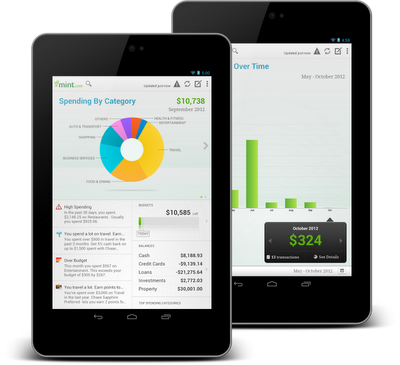
The benefits of building an app that works great on tablets is evident in the experiences of Mint.com, Tiny Co, and Instapaper who reported increased user engagement, better monetization, and more downloads from tablet users. You can find out more about their experience in these developer case studies.


The Tablet Quality Checklist is a great place to get started, but it’s just the beginning. We’ll be sharing more tablet development tips every day this week on +Android Developers. In Android Developers Live, Tuesday’s Android Design in Action broadcast will focus on optimizing user experience for tablets, on Thursday we’ll be interviewing our tablet case studies during Developers Strike Back, and on Friday’s live YouTube broadcasts of The App Clinic and Friday Games Review will be reviewing apps and games on Android tablets.


What are your best tips for building great

tablet apps?


Join the discussion on

+Android Developers